Search This Blog

Sunday, December 1, 2013

BB FlashBack


The Screen Recorder With Everything You Need

Get Your Point Across
Create engaging movies by adding text, sound and images to your screen recording.
Make sure your audience doesn't miss a thing with easy-to-use Zoom-Pan and AutoScroll effects.
Create polished tutorials and presentations with the help of powerful editing functions.
Do it the easy way with BB FlashBack screen recorder.


Simple Sharing
Its never been easier for everyone to see your movies.
BB FlashBack screen recorder uploads to YouTube, Blip.tv, Viddler and Revver and gives you a URL you can share around.


Flexible Publishing
Reach the widest possible audience. BB FlashBack screen recorder exports to AVI, Flash, QuickTime (H.264), MPEG4 (compatible with iPod/Pad/Phone), GIF, WMV, EXE and PowerPoint.
You decide how your screen recording will be presented. Full control over sound and video quality and filesize.
Full playback controls in Flash and EXE exports.

Full-Featured Recording


BB FlashBack screen recorder uses a number of different recording technologies to get the best from PCs old and new.
Capture online events unattended with scheduled recording.
Make notes at record-time and edit them in playback.
Record indefinitely and limit the file size by keeping only the last few minutes.


Webcam Recording and Picture-in-Picture Video
Give your presentations the personal touch with webcam video.
The BB FlashBack screen recorder records from your webcam while it records your screen. Easy.
You can also import video files as picture-in-picture video.

Powerful Editing (Pro Edition only)
Take your tutorials and presentations to the next level with the most powerful editing functions of any screen recorder.
BB FlashBack lets you fine-tune your movies, editing multi track sound and video side-by-side.


Convert hub


       Transform, convert and change pictures, photos, avatars, drawings, sketches, designs, thumbnails, wallpapers, bitmaps, vector graphics, illustrations, charts, diagrams or any other image files free online! Import and export to different image formats


Step by Step Usage:

Add a folder of source images or hand select the image files.
Specify the operations (conversion, resizing, rotating, flipping, etc.) for the images.
Specify the destination / output folder.
Click "Convert" and the jobs will be done


Operations & Features:
Format conversions from more than 40 popular image formats.
Resizing (enlarging or shrinking) images of any type, by percentage or by pixels.
Rotate images by 90 / 180 degrees, clockwise or anti-clockwise.
Flip images, horizontally or vertically.
Specify JPEG quality (10 - 100) and icon sizes (16x16, 32x32, etc.)


Download

Total Video converter


Main Features of Total Video Converter:

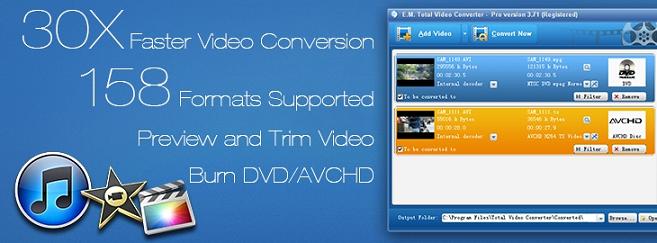
        Convert all kinds of videos to mobile videos or audios (mp4, 3gp, xvid, divx mpeg4 avi, amr audio) which are used bycell-phone, PDA, PSP, iPod, iPhone, Xbox360, PS3 etc.;
Photos slide show combines multi-photos and musics with more than 300 photos fantasy transition effect;
 High compatibility and high efficiency for Importing RMVB or RM video/audio;
 Convert various videos to MPEG videos compatible with standard DVD/SVCD/VCD;
 Burn the converted videos to DVD/SVCD/VCD;
 Rip DVD to popular videos of all sorts;
 Extract audio from various of videos and convert which to all kinds of audios (mp3, ac3, ogg, wav, aac);
 RIP CD to audios of all sorts directly;
 Support using with command line;
Combine several video and audio files to one video file;
Demultiplex or extract video and audio;
Multiplex video and audio to one file;
Flv Nelly Mosser audio extract and decode.


Total Video Converter supports reading the following file formats:

Video Formats:
Convert from Real Video Rmvb (.rm,.rmvb) 
Convert from MPEG4 (.mp4) 
Convert from 3gp (.3gp, 3g2) 
Convert from Game Psp (.psp)
Convert from MPEG1 (.mpg, mpeg) 
Convert from MPEG2 PS (.mpg, mpeg, vob) 
Convert from MPEG2 TS (DVB Transport Stream) 
Convert from DIVX (.divx) 
Convert from Ms ASF (.asf, .wmv) 
Convert from Ms AVI (.avi)
Convert from Macromedia Flash video FLV (.flv) 
Convert from Apple Quicktime (.mov) 
Convert from FLIC format (.fli, .flc) 
Convert from Gif Animation (.gif) 
Convert from DV (.dv) 
Convert from Matroska (.mkv) 
Convert from ogm (.ogm) 
Convert from Video Formats Dx9 Directshow can open   


Audio Formats:Convert from CD audio (.cda) 
Convert from MPEG audio (.mp3, mp2) 
Convert from Ms WAV (.wav) 
Convert from Ms WMA (.wma) 
Convert from Real Audio (.ra) 
Convert from OGG (.ogg) 
Convert from Amr audio (.amr) 
Convert from AC3 (.ac3) 
Convert from SUN AU format (.au) 
Convert from Macromedia Flash embedded audio (.swf) 
Convert from Audio Formats Dx9 Directshow can open  


Saturday, November 30, 2013

HT Employee Monitor


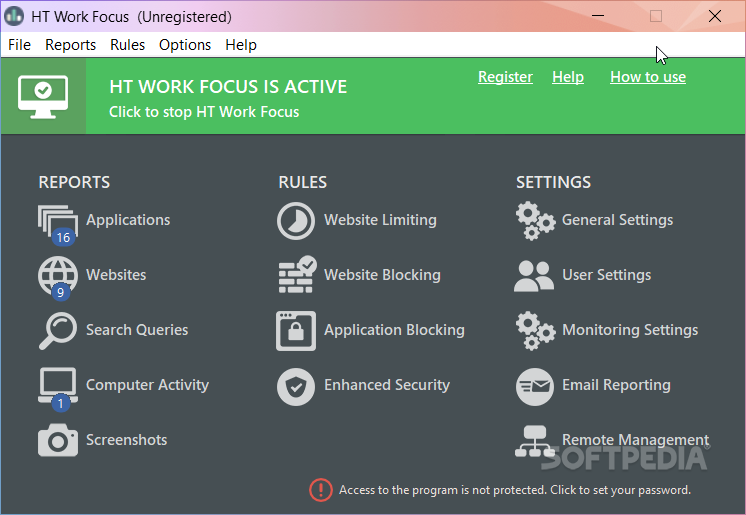
            HT employee monitoring software is professional surveillance software, designed to monitor and control employee activities. The software contains many features to improve employee productivity and prevent the wasting of work time.HT Employee Monitor records all your employees' computer activities and gives you remote access to this information, including typed keystrokes, visited websites, opened applications, screenshots, and more. The software helps you to increase employee productivity with monitoring, as well as by blocking activities that are not work-related such us Facebook, Twitter, instant messengers, specified web content, etc. 


Do you want to improve employee discipline and productivity? You should try employee monitoring software.


Install this employee monitoring software and let your employees know that all their computer activities are recorded. Just knowing that they're monitored, employees work more efficiently. Statistics confirm that surveillance improves employee discipline and their productivity.


Key features


Remote Management


Remote Management is a NEW feature which allows you to monitor your employee activity remotely in REAL TIME. Just enable Remote Management in the program and access Web Console using your web browser. Now you don't need access the computer to set up restrictions on unwanted websites and program.


Web History


The most important feature in regards to monitored activities is a list of visited websites, which highlights employee activities that are not work-related. The Web History feature records the URLs and page titles of visited websites, as well as timestamps. Even if employees clear their web browser's history it does not hide their viewing of inappropriate internet content. The program is compatible with all versions of the following browsers: Google Chrome, Firefox,Internet Explorer, Opera, and others.

Keystrokes Recorded

Our employee monitoring software records all typed keystrokes in any application including chat, email, word processing, web browsers and others. The Keystroke History log report includes typed text, title of document, and timestamps. See exactly what employees type on the computer!


Application monitoring

Another feature of our Employee Monitor is the tracking of applications used by employees. It lets you find out if an employee is wasting time at work (playing solitaire instead of working). The detail log reports will tell you exactly which applications were run and when, and also record application window titles so you can see exactly what your employee was doing.


Screenshot Capturing


Screenshot history provides visualization of employees' activities which can make it obvious just what employees are doing. Employee Monitor captures a full color computer screenshot with customizable intervals and image quality.

Computer Activity

Our employee monitoring software tracks the time a computer was turned on and off. It gives a manager the opportunity to know exactly how much time employees spend at the workplace, and therefore to take measures against truancy and lateness.


Remote Monitoring


It is no longer necessary for managers to manage employees in person. The remote monitoring feature enables viewing of employees' PC activities with just a few mouse clicks via the e-mail delivery of log files. So even when you are far from the office you will know what your employees are doing. Let your employees know that managers and supervisors can see what is happening on their computers in real time even from remote locations — it improves discipline and productivity!

Block Websites / Filter content

Without monitoring employees have the temptation to surf the Internet and waste work time. Our software can help to prevent weak-willed employees from doing this. The Block Websites feature disallows inappropriate Internet content by categories, URLs, or keywords. For example, you can block Facebook.

Block Applications

Games, instant messengers, web browsers, network games, etc. can be big time-wasters. Sometimes a large group of employees plays a network game for hours, and everybody knows about it except the boss. Employee Monitor allows you to block program, for example, instant messengers, games, and any other programs that managers want to prohibit.

Block Installers

Sometimes the most harmful thing to a computer can be a newly installed program. Databases, servers and desktop computers can be crashed by inexperienced PC users who try to install new applications that may contain spyware, adware, or in the worst case, viruses.


Multi-user


The program allows you to monitor and limit every PC user account independent of its rights. It is convenient for managers to create a few user accounts with different sets of rights, and monitor and limit them with our computer monitoring software in different ways.

Invisible mode and password protection

You may want to hide the act of computer monitoring, so HT Employee Monitor can work in a special stealth mode. Only the owner of HT Employee Monitor who knows the special hotkeys can access the program. In addition, to prevent employees accessing and uninstalling the software, you can set a password. The combination of invisible mode and password provides stronger protection.


Friday, November 1, 2013

Typing Master Pro


      TypingMaster Pro's complete typing curriculum leads students step-by-step to fluent error-free typing. 
After learning the correct technique and using it in real life, students will typically type 3-5 times faster
 with over 98% accuracy.

It takes only from 6 to 10 hours to learn the basics of touch typing with TypingMaster. After this 
students can start using their new skill in their everyday life. Shortly their keyboarding will become 
subconscious and fluent.


Helping the Teacher

TypingMaster's network tools make teaching typing significantly easier and more enjoyable. 
Automatically recording personal study data for each student as well as calculating results and test 
scores, TypingMaster saves the teacher's time and energy allowing them to focus attention on the 
individual needs of their students.


Motivated Learning


For students TypingMaster offers an enjoyable and motivating way to learn to type. Multi-form exercises such as keyboard drills, typing games and tests, provide diversity whilst instant feedback and long-term progress statistics effectively maintain motivation


Thursday, October 31, 2013

Folder Lock

Protect your data from unwanted access and visibility by blocking access to the files, folders, drives, and programs.
Windows kernel level locking and filter driver makes it possible to lock files and folders in Windows Safe Mode.
Folder Lock's easy to use and understand user-interface allows single-click data protection straight from the Context Menu.
Encrypt Files!
With Folder lock you can encrypt your personal files using 256-bit on-the-fly military grade encryption technology.
Create storage lockers which keep your important files encrypted, ensuring the integrity of your data's security.
Encrypted lockers are dynamic, smaller in size when created and grow as your data storage need increases.
Secure Backup!
Upload all your private data you keep in your Lockers onto a cloud server without manually managing your backups.
Secure backup process is automatic and real-time, all changes or modification to your files in your 'Lockers' are synched.
Folder Lock is the only solution that offers this patent pending technology providing end-to-end data encryption and backup simultaneously.
Protect USB/CD!
You can copy encrypted lockers to a USB & other external data storage devices using the Protect USB Drive feature.
With protect CD/DVD option; you can convert existing lockers to become portable and executable, enabling you to burn lockers onto a CD/DVD.
Send private and confidential email securely with encrypt email attachment feature, it allows users to send sensitive data over the internet securely.

WinZip


        With more than a billion downloads, WinZip is the world’s leading provider of zip utilities and one of the most popular and trusted applications in the history of the Web.
WinZip Computing, a Corel company, draws on its core strength as the #1 zip software provider to deliver the power of compression and encryption to where it’s needed most – email, mobile, social media and online. WinZip's offerings include apps for Windows, Mac, iOS and Android, the ZipSend and ZipShare online services, and WinZip System Utilities Suite.


  :::::::Features:::::::

Creation of, addition to, and extraction from ZIP archives.
Configurable Microsoft Windows Shell integration
Direct write of ZIP archives to CD/DVD
Decoding of .b64, .hqx, .uue formats.
Automation of backup jobs
Integrated FTP upload
Email ZIP archives
Decompression of following archive formats: .bz2, .rar, LHA/LZH (native in 11.2), 7z (12.0).
Support for ARC and ARJ archives if suitable external programs are installed


WinRAR

            Using WinRAR puts you ahead of the crowd when it comes to compression by consistently making smaller archives than the competition, saving disk space and transmission costs.
WinRAR provides complete support for RAR and ZIP archives and is able to unpack CAB, ARJ, LZH, TAR, GZ, ACE, UUE, BZ2, JAR, ISO, 7Z, Z archives.


   ::::::: Features:::::::
               
WinRAR is a powerful software compression tool with a host of integrated additional functions to help you organize your compressed files, folders and archives.
New functionality updates of WinRAR and RAR are available for free downloading several times each year.
WinRAR supports all popular compression formats (RAR, ZIP, WinZip, CAB, ARJ, LZH, ACE, TAR, GZip, UUE, ISO, BZIP2, Z and 7-Zip). For more information see our comparison page.


There was a portable version of WinRAR called WinRAR Unplugged, which did not require installation or create dependencies on the host computer.


Download

Recuva

Accidentally deleted an important file? Lost something important when your computer crashed? No problem! Recuva recovers files deleted from your Windows computer, Recycle Bin, digital camera card, or MP3 player.


::::::: Features:::::::

Improved Deep Scan for exfat and Fat.

 Added envelope sweep to Windows Explorer connection menus. 

 Added new record growths to channels. 

Improved correctness of output facts. 

 Improved convenience of envelope program. 

 Improved uninstallation of menu things. Fixed minor bug in secure overwrite on exfat record frameworks. 

Minor changes to the recuperation wizard. Minor Gui changes.

 Framework Requirements Runs on Microsoft Windows 8, 7, Vista, Xp and 2000. Counting both 32-cycle and 64-cycle forms


Internet Download Manager

       
           Internet Download Manager (also called IDM) is a shareware download manager. It is only available for the Microsoft Windows operating system


:::::Features:::: 

 Divides downloads into multiple streams for faster downloading

Batch downloads Import/Export download jobs

Auto/manual updating of download address

Multiple queues Recent downloads list for easy access to files

Video downloading from streaming video site

 IDM supports the following web browsers: Internet Explorer, Opera, Netscape Navigator, Apple Safari, Flock, Google Chrome, Mozilla Firefox, a nd many others.


Download